

Appearance
Transactions external validation
This feature allows you to validate or refuse end users payments, in real time and based on your custom criteria.

Information – Treezor offers its own Transaction Rules Engine
Therefore, you no longer need to implement your criteria with the external validation. Contact Treezor to find out which option works best for you.
Setup
During the implementation of this feature, Treezor configures the following elements.
| Element | Description |
|---|---|
| API endpoint URL | The URL of your REST API endpoint that receives authorization requests. |
| Timeout | The response time limit. Default is 1 second. A longer timeout can be configured on demand. |
| Authentication | The token Treezor uses to authenticate with your endpoint. |
The authentication token can be sent in one of the following ways:
- Bearer header (default) –
Authorization: Bearer <token> - Custom header – A header of your choice, e.g.,
X-My-Auth: <token> - Query parameter – A parameter of your choice, e.g.,
?authToken=<token>

Configuration – Contact Treezor to set up external authorization
Provide your endpoint URL, preferred authentication method, and any timeout requirements during onboarding.
General process
The external validation process works as follows.
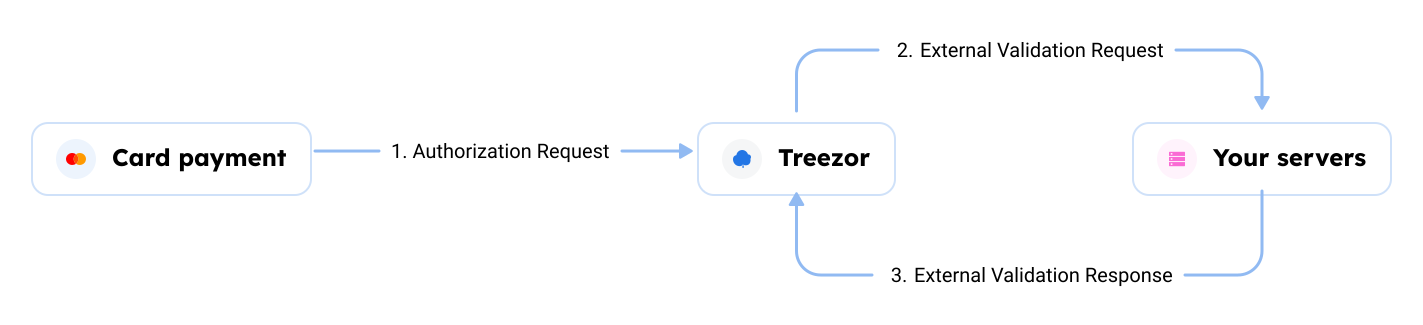
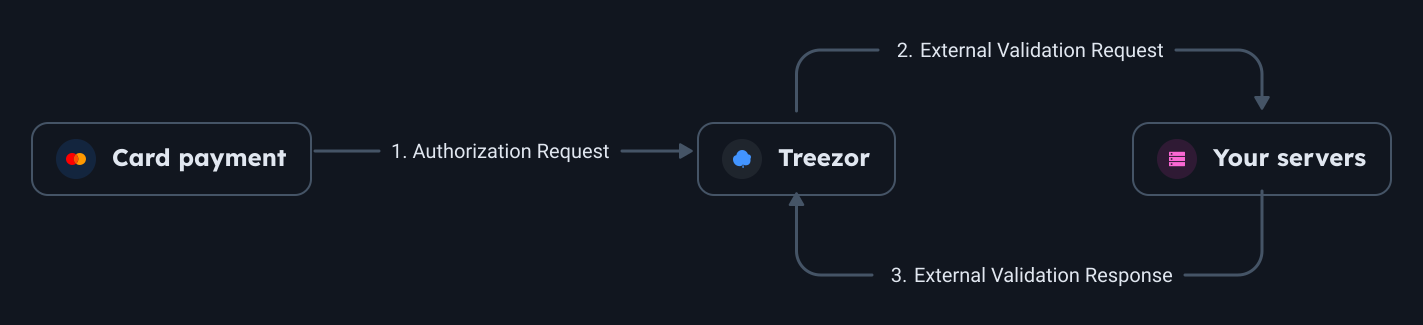
- Authorization Request – The end user makes a purchase with a Card.
- External Validation Request – Treezor sends you an HTTP Request to a predefined endpoint of your own REST API.
- External Validation Response – Your software makes a decision based on your own criteria and returns the decision in the HTTP Response.
- If you refuse, the transaction is declined.
- If you fail to answer within the allowed time frame, the transaction is declined.
- If you accept, Treezor handles the Authorization request like it would normally (Authorized Balance verifications, MID/MCC restrictions, etc.).
- A
cardtransaction.createwebhook is sent. It includes therequestIdof the External Validation request.
Treezor only calls your endpoint for authorization requests. Other message types (reversals, negative advice, settlements) do not trigger a callback – you receive them as cardtransaction.create webhooks only. Use the paymentId attribute to reconcile related messages across the transaction life cycle.
Information – Your response must be provided within the configured timeout
The default timeout is 1 second. If no response is received within this time frame, the authorization is automatically declined. Contact Treezor to configure a longer timeout if needed.
Request example
A POST request is sent to your API endpoint. The payload structure depends on whether extended fields are enabled for your configuration.
json
{
	"request_id": "e03df174-ff01-571c-8677-e52af53affda", 	// UUIDv5
	"card_public_token": "988927734", 						// card Public Token
	"request_date": "2021-04-20T10:29:44+00:00", 			// Date/time of sending (RFC 3339 format)
	"payment_amount": {
		"value": 17.01, 									// Payment amount, including all fees, float. Positive for a Debit, Negative for a Credit.
		"value_smallest_unit": 1701, 						// Payment amount, including all fees, in the smallest unit of associated currency
		"currency_code": "978" 								// Billing currency - ISO 4217 3 digit
	},
	"payment_local_amount": {
		"value": 7.01, 										// Payment amount in local currency, float
		"value_smallest_unit":701, 							// Payment amount in local currency, in the smallest unit of associated currency
		"currency_code": "978" 								// Local currency - ISO 4217 3 digit
	},
	"payment_local_time": "145958", 						// Local time of transaction - “hhmmss”
    "payment_local_date": "20210420",                       // Local date of transaction - "yyyymmdd"
    "local_day_of_week": 5,                                 // local day of week: 1,2,3,4,5,6,7 with 1 being Monday
	"authorization_issuer_id": "928257521", 				// Transaction Unique ID from the Card Processor
	"merchant_data" : {
		"id": "000980200909995", 							// Merchant ID
		"name": "PAYPAL ", 									// Merchant Name
		"city": "PARIS", 									// Merchant City
		"country_code": "FRA", 									// Merchant Country - ISO 3-alpha country code
		"mcc": "4512", 										// Merchant Category Code
		"acquirer_id": "06004441" 							// Acquirer ID
	}
}The exemption_type_3ds field in the extended payload uses the same values as exemptionType3ds in the Card Transaction object. See 3DS Exemption Type for the complete list.
Response example
All requests must be answered to.
Approve the transaction
If you approve the card transaction, you can answer with the following JSON response.
json
{
	"response_date": "2021-04-20T10:29:49+00:00", 			// Date/time of your decision (RFC 3339 format)
	"response_code" : "AUTHORIZED", 						// Your decision
	"response_id": "e03df174-ff01-571c-8677-e52af53affda" 	// Unique response ID that you have generated (It can be a signature of the provided requestId)
}Refuse the transaction
If you refuse the card transaction, you can answer with the following JSON response.
json
{
	"response_date": "2021-04-20T10:29:49+00:00", 			// Date/time of your decision (RFC 3339 format)
	"response_code" : "DECLINED", 							// Your decision, other values are available in the list below
	"response_id": "e03df174-ff01-571c-8677-e52af53affda" 	// Unique response ID that you have generated (It can be a signature of the provided requestId)
}Dynamic account selection
If you are using dynamic card account selection, the wallets array is to be included in your response, with the following attributes.
| Attribute | Type | Description |
|---|---|---|
id | string | The unique identifier of the Wallet to debit. |
priority | integer | The priority of the rule in case of conflict. The higher the value, the higher the priority. This field is required if the id is provided. Max. value: 100. |
Here is a JSON response example.
json
{
	"response_date": "2021-04-20T10:29:49+00:00", 			// Date/time of your decision (RFC 3339 format)
	"response_code" : "AUTHORIZED", 						// Your decision
	"response_id": "e03df174-ff01-571c-8677-e52af53affda", 	// Unique response ID that you have generated (It can be a signature of the provided requestId)
	"wallets" : [                                           // Wallet IDs / priority list // can be empty or have one or more items
    {
      "id": "123456",
      "priority": 50
    }
  ]
}Response Codes (responseCode)
You can answer to an External Validation request with the following codes:
| Code | |
|---|---|
 | AUTHORIZED |
 | DECLINED |
| DECLINED_CARD_UNKNOWN |
| DECLINED_DATETIME_INVALID |
| DECLINED_DUE_TO_REGULATORY_RULES |
| DECLINED_INSUFFICIENT_FUNDS |
| DECLINED_INSUFFICIENT_FUNDS_WITHDRAWAL_LIMIT_REACHED |
| DECLINED_LOCAL_CURRENCY_INVALID |
| DECLINED_MCC_INVALID |
| DECLINED_MERCHANTID_INVALID |
| DECLINED_MERCHANT_CITY_INVALID |
| DECLINED_MERCHANT_COUNTRY_INVALID |
Information – Other responses may occur
Any other response will be considered as DECLINED.
Balance management
Treezor supports two balance management approaches, depending on whether you use Treezor Wallets or manage your own ledger.
Treezor-managed balances
When Treezor manages wallets and balances, the standard flow applies:
- Authorization – Accepted authorizations block funds on the Wallet's Authorized Balance.
- Settlement – At settlement, blocked funds are released and the Wallet is debited or credited.
- Expiry – If no settlement occurs, the blocked funds are released after a configurable delay.
Client-managed balances
When you manage your own ledger (typically in BIN Sponsorship setups):
- Authorization – No fund blocking occurs on Treezor's side, since Treezor doesn't hold the funds.
- Settlement – At settlement, all compensations debit or credit a single Master Wallet configured for your setup.
- Funding – You must provision the Master Wallet to cover incoming settlement debits.