

Appearance
International Transfers Beta
International transfers allow you to receive and send funds internationally (outside the SEPA network), and thus in different currencies.

Configuration – International Transfers are not enabled by default
Please contact Treezor if you're interested in this feature.
Introduction
The International Transfer feature allows you to send and receive funds globally, in the supported countries and currencies.
An international transfer usually takes 1 to 6 business days to reach the beneficiary’s account. This delay varies depending on the opening schedules and international wire cut-off times of the bank you deal with. Treezor relies on a third-party provider to process international transfers.
Supported currencies
Treezor currently supports the following currencies for international transfers. Please note this list may change over time.
| Code | Country | Name | Reception | Emission |
|---|---|---|---|---|
| AED | United Arab Emirates | United Arab Emirates Dirham |  |  |
| ARS | Argentina | Argentine Peso | | |
| AUD | Australia | Australian Dollar | | |
| BHD | Bahrain | Bahraini Dinar | | |
| BRL | Brazil | Brazilian Real | | |
| CAD | Canada | Canadian Dollar | | |
| CHF | Switzerland | Swiss Franc | | |
| CLP | Chile | Chilean Peso | | |
| CNY | China | Chinese Yuan | | |
| CZK | Czech Republic | Czech Koruna | | |
| DKK | Denmark | Danish Krone | | |
| GBP | United Kingdom | Pound Sterling | | |
| HKD | Hong Kong | Hong Kong Dollar | | |
| HUF | Hungary | Hungarian Forint | | |
| IDR | Indonesia | Indonesian Rupiah | | |
| ILS | Israel | Israeli Shekel | | |
| INR | India | Indian Rupee | | |
| JPY | Japan | Japanese Yen | | |
| KRW | South Korea | South Korean Won | | |
| KWD | Kuwait | Kuwaiti Dinar | | |
| MAD | Morocco | Moroccan Dirham | | |
| MXN | Mexico | Mexican Peso | | |
| MYR | Malaysia | Malaysian Ringgit | | |
| NOK | Norway | Norwegian Krone | | |
| NZD | New Zealand | New Zealand Dollar | | |
| OMR | Oman | Omani Rial | | |
| PLN | Poland | Polish Zloty | | |
| QAR | Qatar | Qatari Riyal | | |
| RON | Romania | Romanian Leu | | |
| RSD | Serbia | Serbian Dinar | | |
| SAR | Saudi Arabia | Saudi Riyal | | |
| SEK | Sweden | Swedish Krona | | |
| SGD | Singapore | Singapore Dollar | | |
| THB | Thailand | Thai Baht | | |
| TND | Tunisia | Tunisian Dinar | | |
| TRY | Turkey | Turkish Lira | | |
| USD | United States | US Dollar | | |
| UYU | Uruguay | Uruguayan Peso | | |
| ZAR | South Africa | South African Rand | | |
| EUR | Europe (SEPA) | Euro | | |
Fees management
International transfers come with fees from all the actors:
- Charged by Treezor – Each month, as agreed upon in your contract with Treezor.
- Included in each transfer (reception only) – Issuance fees, correspondent fees, and exchange fees.
To mitigate your costs, you can collect fees from your end users regarding International Transfers by using Wallet-to-Wallet (P2P) Transfers with the dedicated transferType value (3).

Best practice – You must expose the fees to your end users
You are legally obliged to expose the fees you plan on collecting with P2P Transfers when emitting international transfers.
Received International Transfers


Exchange rates
Treezor Wallets are euro-denominated; therefore, the wallet is always credited in euros when receiving an international transfer.
Exchange rates are handled as follows:
- If the originating bank sends a euro-denominated operation to Treezor, then the originating bank has already applied its exchange rate.
- If the originating bank sends a non-euro-denominated operation to Treezor, Treezor’s exchange rate applies.
Detailed information regarding the exchange rate and applied fees is available in the additionalData object of the Payin.
Processing flow
When receiving an International Transfer, Treezor operates controls on the transfer before accepting it.
You can receive the following webhooks for an international transfer.
| Event | Status | Description | |
|---|---|---|---|
payin.create |  | PENDING | Treezor receives an International Transfer. |
payin.update | | VALIDATED | Treezor accepts the International Transfer. |
payin.cancel |  | CANCELED | Treezor rejects the International Transfer. |
Webhooks diagram
The Received International Transfer Payin object
json
{
    "payins": [
        {
            "payinId": "0049e4d5-7510-4765-974e-66fba1233a06",
            "payinTag": "",
            "payinStatus": "VALIDATED",
            "codeStatus": "",
            "informationStatus": "",
            "walletId": "12345678",
            "userId": "12345678",
            "cartId": null,
            "walletEventName": "main account",
            "walletAlias": "main-account-123",
            "userFirstname": "Alex",
            "userLastname": "Oak",
            "messageToUser": "messageTesting",
            "paymentMethodId": "28",
            "subtotalItems": "",
            "subtotalServices": "",
            "subtotalTax": "",
            "amount": "1.23",
            "currency": "EUR",
            "distributorFee": null,
            "createdDate": "2025-09-20 21:07:21",
            "createdIp": null,
            "paymentHtml": null,
            "paymentLanguage": null,
            "paymentPostUrl": null,
            "paymentPostDataUrl": null,
            "paymentAcceptedUrl": null,
            "paymentWaitingUrl": null,
            "paymentRefusedUrl": null,
            "paymentCanceledUrl": null,
            "paymentExceptionUrl": null,
            "ibanFullname": "ALEX OAK",
            "ibanId": null,
            "ibanBic": "BIC-REVOFRP2XXX",
            "ibanTxEndToEndId": "aa002083-1705-46cd-98cf-04a5bb467afc",
            "ibanTxId": null,
            "refundAmount": "",
            "forwardUrl": "",
            "payinDate": "2025-09-19",
            "mandateId": 0,
            "creditorName": "CHRIS WILLOW",
            "creditorAddressLine": "165 Pine street, PARIS 75007",
            "creditorCountry": "FR",
            "creditorIban": "FR7616798000010001661493000",
            "creditorBIC": "1",
            "virtualIbanId": 0,
            "virtualIbanReference": "",
            "totalRows": null,
            "DbtrIBAN": "FR4912739000506642887939D34",
            "additionalData": [
                "{\"fees\":[{\"currency\":\"CAD\",\"type\":\"conversion\",\"value\":0.01},{\"currency\":\"CAD\"},{\"currency\":\"CAD\"}],\"exchange\":{\"instructed_currency\":\"CAD\",\"exchange_rate\":0.615915,\"instructed_value\":2}}"
            ]
        }
    ]
}Key attributes
Below are some of the few Payin attributes specificities for received international transfers.
| Attribute | Type | Description |
|---|---|---|
paymentMethodId | string | The type of payin. The value is 28 for international transfers |
DbtrIBAN | string | The account number of the transfer issuer. In the international system, this number may refer to an IBAN, BBAN, etc. |
additionalData | array | Contains all the information regarding the fees, currency, and exchange rate of the international transfer. See the Additional data section below for more information. |
ibanBic | string | The concatenation of the type of bank code and its value. Example: BIC-CMCIFRPAXXX |
ibanTxEndToEndId | string | The unique End-to-End Transaction Reference (UETR). This is a reference shared by all parties involved in the payment chain. It allows the transaction to be identified throughout the network. |
payinDate | string | The date on which Treezor received the international transfer. Format: YYYY-MM-DD |
createdDate | string | The date on which the transfer was carried out. Format: YYYY-MM-DD HH:mm:ss |

API – API Reference available
For a complete list of Payin attributes, check the Payins section of the API Reference.
Additional data (additionalData)
Information regarding fees, currency, and exchange rate are contained in the additionalData.
| Attribute | Type | Description |
|---|---|---|
fees.currency | string | The currency in which the fees were charged. |
fees.type | string | The type of fees. When using the Treezor International Transfer feature, the type is always valued to conversion. |
fees.value | number | The amount of the fees, expressed in the fees.currency. |
exchange.exchange_rate | number | The exchange rate applied. |
exchange.instructed_currency | string | The currency in which the transfer was initially processed. |
exchange.instructed_value | number | The amount of the transfer expressed in its initial currency (exchange.instructed_currency). This value doesn't take into account fees the emitting bank applies. |
Return of a received International Transfer
When receiving an International Transfer, Treezor might not be able to credit the wallet.
It can occur when, for instance:
- The beneficiary wallet is closed;
- The beneficiary wallet is incorrect;
- The International Transfer was made in an unsupported currency.
In such cases, Treezor sends you a payin.cancel webhook, with the reason specified in the informationStatus.
Emitted International Transfers Beta
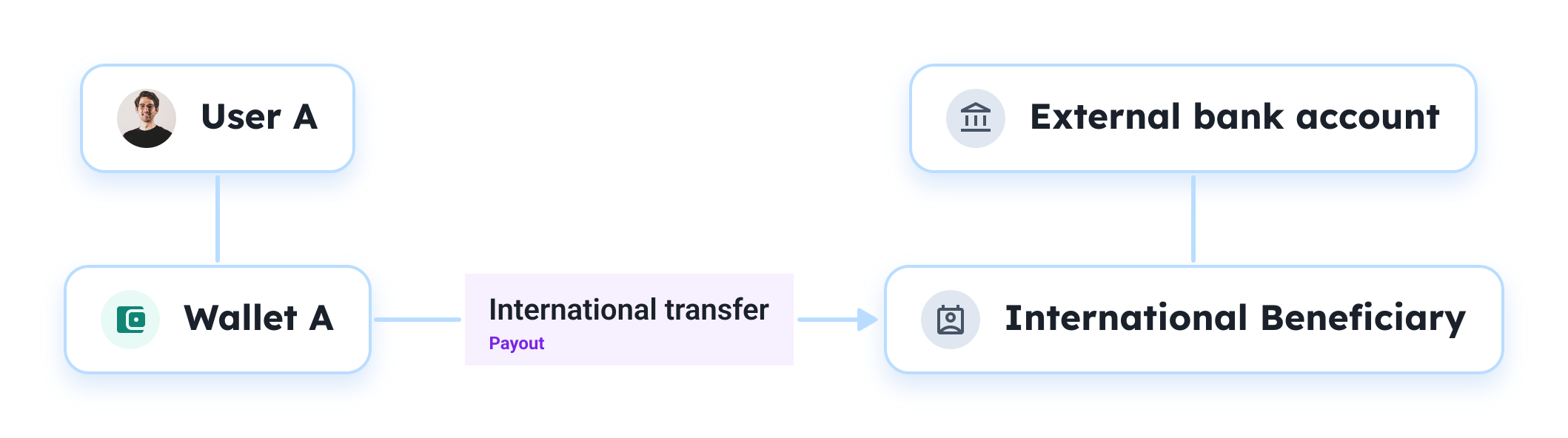
Emitting an international transfer requires an international beneficiary and a quote before making the payout request.
Requirements
- The sender's User must be valid and not frozen
- The sender's Wallet must be valid and allow for international transfers
- You have created an active International Beneficiary at least 48 hours before
Processing flow
Creating a Quote

Prerequisites – You have an internationalBeneficiaryId
You have created an active International Beneficiary at least 48 hours before.
Before sending money internationally, you must request a Quote.
The Quote tells you exactly how much the transfer will cost, the exchange rate applied, and when the funds will arrive. This rate is guaranteed for 30 minutes (see expirationTime), giving the user a window to accept or reject the transfer conditions.
Request example
Endpoint: /v1/quote
bash
curl -X POST '{baseUrl}/v1/quote' \
	--header 'Authorization: Bearer {accessToken}' \
	--header 'Content-Type: application/json' \
-d '{payload}'Here is an example of {payload}:
json
{
    "internationalBeneficiaryId": "550e8400-e29b-41d4-a716-446655440000",
    "sourceAmount": 1000,
    "sourceCurrency": "EUR",
    "targetCurrency": "USD"
}Returns the Quote object.
json
{
  "quotes": [
    {
      "quoteId": "b8a2f1e4-7d3c-4e8a-92b1-5f0c9a6d4211",
      "userId": 123456,
      "sourceAmount": 123.45,
      "sourceCurrency": "EUR",
      "targetAmount": 121.98,
      "targetCurrency": "USD",
      "rate": "1.4",
      "fees": {
        "transferwise": 1,
        "payIn": 1,
        "discount": 1,
        "partner": 1,
        "total": 1
      },
      "createdDate": "2026-01-23T14:30:00Z",
      "estimatedDelivery": "2026-01-29T14:30:00Z",
      "rateExpirationDate": "2026-01-23T14:30:00Z",
      "expirationDate": "2026-01-22T15:00:00Z"
    }
  ]
}You can now create the international transfer with the received quoteId.
Initiating the Payout
Parameters
Below are the main attributes to create an International Transfer Payout.
| Attribute | Type | Description |
|---|---|---|
payoutTypeId | integer | Value must be 4 for International Transfers. |
walletId | integer | The unique identifier of the debited Wallet. |
internationalBeneficiaryId | integer | The unique identifier of the International Beneficiary of the Transfer. You must have created the International Beneficiary object 48 hours beforehand. |
quoteId | string | The unique identifier of the Quote. |
amount | number | The amount of the credit transfer. Specific mock values must be used in Sandbox, see Emulation article. |
currency | string | The currency of the credit transfer. Must be EUR. |
accessTag | string | A unique identifier used to enforce Idempotency. |
Request example
Endpoint: /v1/payouts
bash
curl -X POST {baseUrl}/v1/payouts \
	--header 'Authorization: Bearer {accessToken}' \
	--header 'Content-Type: application/json' \
-d '{payload}'Here is an example of {payload}:
json
{
    "payoutTag": "PAY-INVOICE-29383",       // max. 250 characters
    "accessTag": "{guid}",                  // max. 250 characters
    "walletId": 44921,
    "payoutTypeId": 4,
    "quoteId": "b8a2f1e4-7d3c-4e8a-92b1-5f0c9a6d4211",
    "internationalBeneficiaryId": "550e8400-e29b-41d4-a716-446655440000",
    "amount": "1000.00",
    "label": "January Marketing Invoice",
    "supportFileLink": "https://[...]/inv_8821.pdf"
}Returns a Payout object with the payoutTypeId value to 4 and its payoutStatus set to PENDING at first. You will then receive sequentially the following webhooks.
| Webhook | When | Specific attributes |
|---|---|---|
payout.create | The international transfer is created. | PENDING status |
payout.update | The international transfer is successful, the wallet is debited. | VALIDATED status |
payout.canceled | The international transfer has failed. | CANCELED status |

Tip – Specific mock values for AML & Fraud checks compliance
In Sandbox, you can emulate compliant or non-compliant international payouts by using the mock values. See Emulation article.