

Appearance
User Relationships
The User Relationships system allows you to link entities together (e.g., legal entity with an individual, or two individuals) via a granular and dynamic role mapping.
This system aims to gradually replace the Parent-Children legacy hierarchical model with a flexible relationship graph. As opposed to the previous model, Relationships allow you to:
- Modify a user's role after creation, which was previously impossible.
- Accumulate multiple roles for a single user without having to create duplicate users.
- Define relationships between a user and multiple companies.
- Inject specific values associated with a relationship, such as the number of shares for an effective beneficiary.
Introduction
The Relationship object can be defined as the link between a source and its target users.
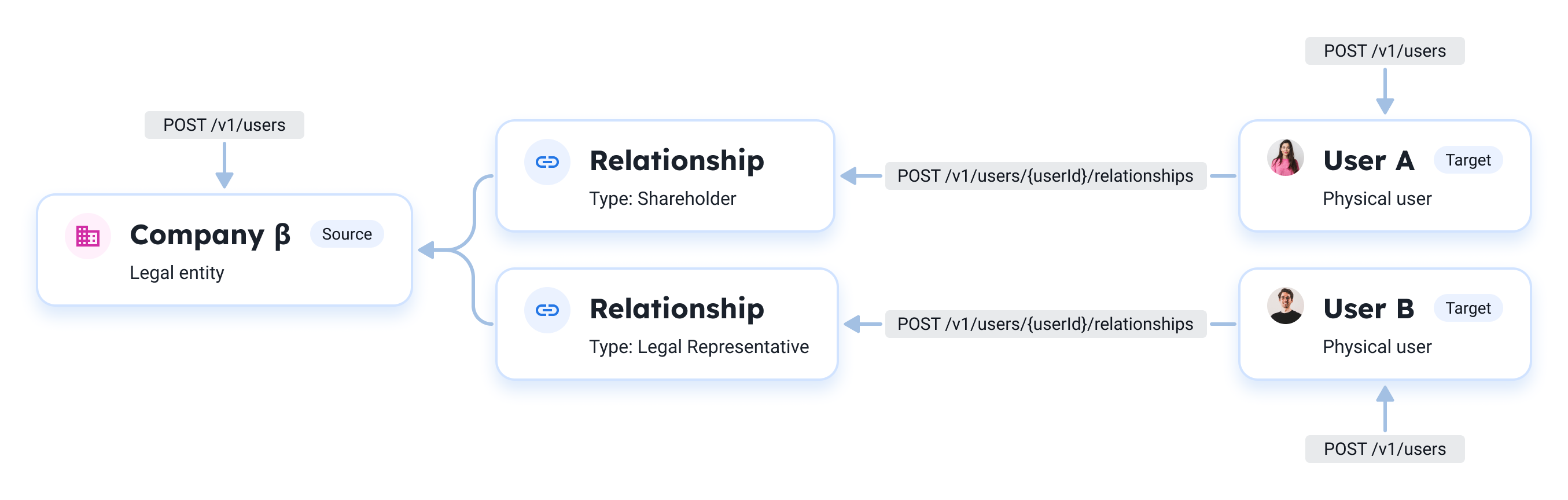
- Source user: The entity holding the relationship (e.g., a company or parent).
- Target user: The linked individual (e.g., legal representative, shareholder, employee, minor).
- Type (link): The nature of the relationship (e.g.,
LEGAL_REPRESENTATIVE).
Key attributes
Below are the main attributes you can find in the Relationship object.
| Attribute | Type | Description |
|---|---|---|
targetUserId | integer | The unique identifier of the target User, linked to the entity. |
sourceUserId | integer | The unique identifier of the source User; holding the relationship. |
relationshipTypeId | integer | The type of relationship between the source user and the target user. See the types of relation. |
relationshipTypeName | string | The name of the relationship between the source user and the target user. See the types of relation. |
value | string | Associated value if included with the role (e.g., % of shares for EFFECTIVE_BENEFICIARY_SHARES). |
Types of relation
Below is the list of currently supported relation types. Please note the list will evolve as Treezor deprecates Parent-Children relations for User Relationships.
relationshipTypeId | relationshipTypeName | Description |
|---|---|---|
1 | LEGAL_REPRESENTATIVE | Links a company (source) with its legal representative (target). A Legal Representative is an individual legally authorized to act on behalf of a company, typically to exercise rights, fulfill obligations, or provide formal consent in legal and administrative matters. |
2 | EFFECTIVE_BENEFICIARY_SHARES | Links a company (source) with its shareholders (target). Shareholders must declare their shares with the value attribute (e.g., "34.11"). An Effective Beneficiary, often referred to as a Ultimate Beneficial Owner, is a natural person who ultimately owns or controls a company, either through direct or indirect ownership of a significant percentage of shares or voting rights. Treezor documentation refers to them as Shareholders. |
3 | COMPANY_REPRESENTATIVE | Links a company (source) with its representative (target). A Company Representative is a specific type of legal relationship where an individual is granted the formal power to execute documents and enter into binding agreements on behalf of a company. This relationship type is often defined by a specific scope of authority or a board resolution. |
4 | EMPLOYEE | Links a company (source) with its employees (target). This type of link is used for employee benefits use cases for instance. |
5 | CHILD | Links a parent individual (source) to their children (target). A Parent Child relation represents a legal or biological connection where a parent holds the authority and responsibility to act in the best interests of a minor or dependent. |
The relationship object
json
{
  "relationshipId": 888,
  "targetUserId": 200,    // Target
  "sourceUserId": 101,    // Source
  "relationshipTypeId": 2,    // Nature
  "relationshipTypeName": "LEGAL_REPRESENTATIVE",
  "value": null
}Creating a Relationship

Prerequisites – You must create the users first
You must first declare both the source and target users using the /v1/users endpoint.
Parameters
Below are the parameters for creating a relationship.
The {userId} path parameter must be the target user (the individual being linked). The request body specifies the source user (the entity holding the relationship).
| Attribute | Type | Description |
|---|---|---|
sourceUserId | integer | The unique identifier of the user who is the source of the current one (e.g., legal entity, parent). |
relationshipTypeId | integer | The type of relationship between the source user and the current user. See the types of relation. |
value | string | Associated value if included with the type (e.g., % of shares for EFFECTIVE_BENEFICIARY_SHARES). Might be required depending on the relationshipTypeId. |
Declaring a legal representative
To declare a legal representative, you create a relationship where {userId} is the target user (individual) and sourceUserId in the body is the legal entity.
Endpoint: /v1/users/{userId}/relationships
bash
curl -X POST '{baseUrl}/v1/users/{userId}/relationships' \
  --header 'Authorization: Bearer {accessToken}' \
  --header 'Content-Type: application/json' \
-d '{payload}'Here is an example of {payload}:
json
{
  "sourceUserId": 101,
  "relationshipTypeId": 1
}Returns the created Relationship object:
json
{
  "relationshipId": 888,
  "targetUserId": 200,
  "sourceUserId": 101,
  "relationshipTypeId": 1,
  "relationshipTypeName": "LEGAL_REPRESENTATIVE",
  "value": null
}Declaring an effective beneficiary
This shareholder type of relationship requires a mandatory associated value for the percentage of shares an effective beneficiary holds.
Endpoint: /v1/users/{userId}/relationships
bash
curl -X POST '{baseUrl}/v1/users/{userId}/relationships' \
  --header 'Authorization: Bearer {accessToken}' \
  --header 'Content-Type: application/json' \
-d '{payload}'Here is an example of {payload}:
json
{
  "sourceUserId": 101,
  "relationshipTypeId": 2,
  "value": "45.75"
}Returns the created Relationship object:
json
{
  "relationshipId": 1498,
  "targetUserId": 202,
  "sourceUserId": 101,
  "relationshipTypeId": 2,
  "relationshipTypeName": "EFFECTIVE_BENEFICIARY_SHARES",
  "value": "45.75"
}Treezor also sends a user.relationship.create webhook.
Declaring a company representative
To declare a company representative, you create a relationship where {userId} is the target user (individual) and sourceUserId in the body is the legal entity granting the representation power.
Endpoint: /v1/users/{userId}/relationships
bash
curl -X POST '{baseUrl}/v1/users/{userId}/relationships' \
  --header 'Authorization: Bearer {accessToken}' \
  --header 'Content-Type: application/json' \
-d '{payload}'Here is an example of {payload}:
json
{
  "sourceUserId": 101,
  "relationshipTypeId": 3
}Returns the created Relationship object:
json
{
  "relationshipId": 889,
  "targetUserId": 200,
  "sourceUserId": 101,
  "relationshipTypeId": 3,
  "relationshipTypeName": "COMPANY_REPRESENTATIVE",
  "value": null
}Treezor also sends a user.relationship.create webhook.
Declaring an employee
To declare an employee, you create a relationship where {userId} is the target user (individual) and sourceUserId in the body is the employing legal entity.
Endpoint: /v1/users/{userId}/relationships
bash
curl -X POST '{baseUrl}/v1/users/{userId}/relationships' \
  --header 'Authorization: Bearer {accessToken}' \
  --header 'Content-Type: application/json' \
-d '{payload}'Here is an example of {payload}:
json
{
  "sourceUserId": 101,
  "relationshipTypeId": 4
}Returns the created Relationship object:
json
{
  "relationshipId": 890,
  "targetUserId": 200,
  "sourceUserId": 101,
  "relationshipTypeId": 4,
  "relationshipTypeName": "EMPLOYEE",
  "value": null
}Treezor also sends a user.relationship.create webhook.
Declaring a child
To declare a parent-child relationship, you create a relationship where {userId} is the target user (child) and sourceUserId in the body is the parent (individual).
Endpoint: /v1/users/{userId}/relationships
bash
curl -X POST '{baseUrl}/v1/users/{userId}/relationships' \
  --header 'Authorization: Bearer {accessToken}' \
  --header 'Content-Type: application/json' \
-d '{payload}'Here is an example of {payload}:
json
{
  "sourceUserId": 102,
  "relationshipTypeId": 5
}Returns the created Relationship object:
json
{
  "relationshipId": 891,
  "targetUserId": 203,
  "sourceUserId": 102,
  "relationshipTypeId": 5,
  "relationshipTypeName": "CHILD",
  "value": null
}Treezor also sends a user.relationship.create webhook.
Retrieving relationships
You can retrieve the list of relationships for a given user.
Endpoint: /v1/users/{userId}/relationships
bash
curl -X GET '{baseUrl}/v1/users/{userId}/relationships' \
--header 'Authorization: Bearer {accessToken}'Returns a paginated list of relationships:
json
{
  "metadata":{
    "pageNumber": 0,
    "pageSize": 10,
    "pageAvailable": 1,
    "totalCount": 3
  },
  "relationships": [
    {
      "relationshipId": 1498,
      "targetUserId": 202,
      "sourceUserId": 101,
      "relationshipTypeId": 2,
      "relationshipTypeName": "EFFECTIVE_BENEFICIARY_SHARES",
      "value": "45.75"
    }
  ]
}Grouping results
You can group results by a specific field using the groupBy query parameter. This changes the response format to return a groups array instead of a flat relationships array.
| Value | Description |
|---|---|
sourceUserId | Groups relationships by their source user. |
targetUserId | Groups relationships by their target user. |
targetSourcePair | Groups relationships by unique source-target pairs. |
When using groupBy, pagination applies to groups rather than individual relationships. The totalCount in the metadata reflects the number of distinct groups.
bash
curl -X GET '{baseUrl}/v1/users/{userId}/relationships?groupBy=sourceUserId' \
--header 'Authorization: Bearer {accessToken}'Returns relationships grouped by source user:
json
{
  "metadata": {
    "pageNumber": 0,
    "pageSize": 10,
    "pageAvailable": 1,
    "totalCount": 2
  },
  "groups": [
    {
      "sourceUserId": 101,
      "relationships": [
        {
          "relationshipId": 1498,
          "targetUserId": 202,
          "sourceUserId": 101,
          "relationshipTypeId": 2,
          "relationshipTypeName": "EFFECTIVE_BENEFICIARY_SHARES",
          "value": "45.75"
        },
        {
          "relationshipId": 1499,
          "targetUserId": 202,
          "sourceUserId": 101,
          "relationshipTypeId": 1,
          "relationshipTypeName": "LEGAL_REPRESENTATIVE",
          "value": null
        }
      ]
    },
    {
      "sourceUserId": 105,
      "relationships": [
        {
          "relationshipId": 1500,
          "targetUserId": 202,
          "sourceUserId": 105,
          "relationshipTypeId": 4,
          "relationshipTypeName": "EMPLOYEE",
          "value": null
        }
      ]
    }
  ]
}Updating a relationship
To modify an existing relationship (e.g., change the share percentage for an effective beneficiary), you can update it using the PUT endpoint.

Alert – The relationshipId changes after update
This operation internally deletes the existing relationship and creates a new one. As a result, the relationshipId in the response will be different from the one in the request path.
Parameters
| Attribute | Type | Description |
|---|---|---|
sourceUserId | integer | The unique identifier of the user who is the source of the current one (e.g., legal entity, parent). |
relationshipTypeId | integer | The type of relationship between the source user and the target user. See the types of relation. |
value | string | Associated value if included with the type (e.g., % of shares for EFFECTIVE_BENEFICIARY_SHARES). Might be required depending on the relationshipTypeId. |
Request example
Endpoint: /v1/users/{userId}/relationships/{relationshipId}
bash
curl -X PUT '{baseUrl}/v1/users/{userId}/relationships/{relationshipId}' \
  --header 'Authorization: Bearer {accessToken}' \
  --header 'Content-Type: application/json' \
-d '$payload'json
{
  "sourceUserId": 105109567,
  "relationshipTypeId": 2,
  "value": "25.5"
}Returns the new Relationship object (note the new relationshipId):
json
{
  "relationshipId": 437,
  "targetUserId": 105109566,
  "sourceUserId": 105109567,
  "relationshipTypeId": 2,
  "relationshipTypeName": "EFFECTIVE_BENEFICIARY_SHARES",
  "value": "25.5"
}Treezor sends both a user.relationship.cancel and a user.relationship.create webhook.
Deleting a relationship
To remove a relationship (e.g., the user is no longer a legal representative of a given company), you can delete the specific relationship.
This action is irreversible; you will have to create a new relationship if the need arise.
Request example
Endpoint: /v1/users/{userId}/relationships/{relationshipId}
bash
curl -X DELETE '{baseUrl}/v1/users/{userId}/relationships/{relationshipId}' \
--header 'Authorization: Bearer {accessToken}'Returns the created Relationship object:
json
{
  "relationshipId": 436,
  "targetUserId": 105109566,
  "sourceUserId": 105109567,
  "relationshipTypeId": 1,
  "relationshipTypeName": "LEGAL_REPRESENTATIVE",
  "value": null
}Treezor also sends a user.relationship.cancel webhook.
Endpoints
| Endpoint | Scope |
|---|---|
/v1/users/{userId}/relationships Create a new relationship for a user (path userId = target user). | read_write |
/v1/users/{userId}/relationships Retrieve the relationships of a user. | read_only |
/v1/users/{userId}/relationships/{relationshipId} Update an existing relationship (path userId = target user). The relationshipId changes. | read_write |
/v1/users/{userId}/relationships/{relationshipId} Remove an existing relationship (path userId = target user). | read_write |